Showing posts with label Twitter. Show all posts

Tuesday, June 28, 2011

Tweet to Conquer! Can the Little Bluebird be Your Secret Weapon?

Topics in this Post Include:
-3 Ways You Can Use Twitter to Drive People to Your Website
-Using Twitter to Promote Your Shows, Events or Products


3 Ways You Can Use Twitter to Drive People to Your Website:
1.    By composing fabulous tweet headlines that attract views. The headline is the only thing readers will see before making the decision to follow your link. If the headline is catchy, they'll pursue it, if it isn't, you've just lost a potential viewer.

2.    By linking those headlines to high quality content. Content should have your potential audience/customers in mind and reward them with something useful, like practical tips, exciting offers or special deals. If the content on our sites is truly remarkable, people will start tweeting about it on their own.

3.    By using the Twitter "Favorites" feature to list positive reviews from your fans. At the bottom of each tweet in your Twitter stream, there is a little star. When you click the little star, that tweet gets added to your Favorites Tab. When you track what people are saying about you using Twitter Search,* favorite all of the positive tweets. These 3rd party testimonies will be valuable to show the public what other people think of your work.
*To monitor yourself (or your theater company) on Twitter, use the Twitter Search Tool (http://search.twitter.com) to search and track what people are saying about your company, products, competitors, events, campaigns or any other hot words in the industry.  Be helpful: if you find in your search that someone is looking for a service you know where to find, respond to connect them with the right people.  Others will begin to do the same for you! 

Using Twitter to Promote Your Shows, Events or Products

Tweet-ups are a great way to get to know your Twitter community offline. The next time you hold an event, fundraiser or open house, tweet about it! The best practice is to send people directly to an event-sign-up page.
VolunTweet-ups are a variation of the above geared toward gathering volunteers for charitable events. The name is still pretty new, but it is already earning a positive reputation for philanthropy across social media. VolunTweet-ups are a great way to get your Twitter followers to support and spread your causes and, as an indirect result: yourself.
The Hashtag for individual events, products and promotions should be selected and agreed upon before your group starts tweeting about them. This will enable you to track the mentions of the specific event, product or promotion using Twitter Search, and will increase each hashtag's likelihood of becoming a Trending Topic.


Selecting a hashtag for an event is also beneficial because:
• During the event, people often use the hashtag while live-tweeting, or tweeting what they see/hear in real-time. The hashtag will aggregate the event tweets, building an online conversation around the event.
• People who are not at the event will see your hashtag and perhaps use it too. A popular #hashtag often sparks curiosity, and people will go to Twitter Search to follow the conversation around the event.
Finally, it doesn't hurt to take a look at best practices to see how others are using Twitter to succeed.  Here are some helpful links:

Did you learn something useful from this post?  Click on the +1 button below so that others may find it!

Sunday, June 12, 2011

Marketing Monday: Why Theaters Should Tell Patrons to Turn ON Their Phones

Take a moment to imagine a scenario with me:

You arrive at the theater to watch a play.  The House Manager (or whomever fills the function) approaches the stage (or loudspeaker) and welcomes the crowd.

"Ladies and Gentlemen," they say, "thank you for joining us at [name of theater company] for [name of play].  At this time, I would like you to take out your cell phones and turn them on."

Now wouldn't that be surprising?

Here are a few things I would love for the House Manager to say next:

  • "Now send a text saying: fan [your page name] to 32665 or FBOOK to like us on Facebook."
  • "Now text 40404 with the message: follow [your username] to follow us on Twitter."
  • "Please turn on our Theater Friendly Phone Application while texting about the show in progress!"
First, I really don't understand why I have not seen this done.  Obviously the people coming into the theater like your organization enough to shell out for tickets, so capturing dozens (even hundreds) of new "likes" and followers each night should be easy!

But wait, what was that last bullet point?

New Idea: The Theater Friendly Phone App

This post was actually inspired by a story I read about a movie theater.  Apparently a patron became disgruntled when she was asked to turn off her cell phone during a movie and management had her thrown out.  The woman's indignation at the turn of events was recorded in a (probably) drunken phone call to the theater.  The theater's response with the ex-patron's inebriated rantings was to add captions and turn the recording into a YouTube video.

While I appreciate a good laugh, and want to smile at their creativity, I feel they're missing a big point:

People don't like to turn off their cell phones.

Even I feel apprehensive when I am unreachable for over two hours.  What if something happened to a family member?  Don't forget that many of those patrons hired a baby sitter and probably want to be contacted in case of an emergency.  So why not take on a huge chance to increase audience engagement for your theater by being the first to allow cell phone usage during a show or movie?  I think it's a great idea, considering that I've also mentioned some astonishing statistics from Google about how addicted Americans are to their phones.

For Review:
  • 72% use their phones while "consuming other media." A third of that use is while watching TV.
  • 39% use their phones while they're in the bathroom .
  • 20% would rather give up their cable TV before giving up their phones.

I want to see an app that:
  1. Is included with the purchase of a show/movie ticket (either as a free download with online purchase or as a QR Code on the physical ticket).
  2. Will dim the screen and mute all sounds on the phone to prevent any obstructions in visibility or audibility for other audience members.
  3. Blocks video recording (though how one would be able to sell a bootleg movie or show from a cell phone is beyond me).
  4. Prompts the user to "like" the theater on Facebook and follow it on Twitter.
  5. Logs ticket purchases and suggests new releases based on the user's preferences (like Netflix and more).
  6. Allows the user to tweet/update their Facebook about the experience at the theater and rate the movie or show.
Will this cause spoilers?  Not any more than usual.  I see most patrons getting on their phones as soon as they leave the theater anyway.  Why not let them talk about you for the two hours they're enjoying your service?

I'm probably going to be giving my code master a call... but in case he's busy: somebody should be doing this!

Controversially Yours,

Photo courtesy of unreality.com.

Thursday, May 19, 2011

Theater Marketing Using 3 Social Networks: Proudly Presented in Bullet Points!

Hey there!  Dramatic Dissemination is back with more big Idea Blogs.  Today's topic covers ways to use three social networking sites to market your theater.  Off we go!

Facebook
  •          You have to create a page for your theater on facebook.  With over 500 million users, the website’s population is larger than every country except for India and China.  If you want to be seen, you have to be there.
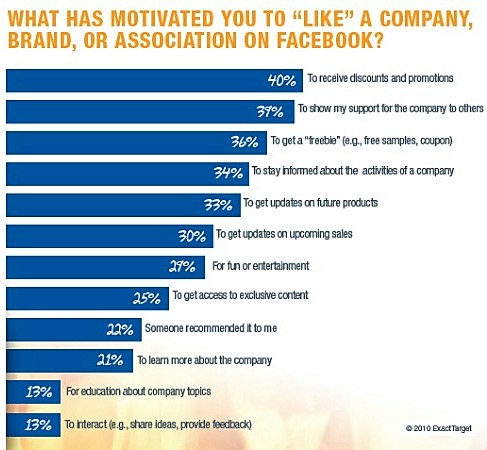
  •          However, when you make your page, keep in mind that the number one reason (at 40%)  facebook users “like” pages is for the purpose of obtaining exclusive promotions and discounts.  You have to give away a little on your facebook page to earn loyalty from your fans.  See the graph below for more reasons people will “like” you.


  •          Work to create true fans.  This means building a relationship with your fan base that allows them to identify with your brand.  Do not use your page for the sole purpose of impersonal updates like “come to our next show!”  or “great job everybody!”  Use your status updates to engage in a conversation with your fans, respectfully discuss their feedback and build a sense of identity between your fans and the culture of your theater.
  •         Set up a store on your facebook page. True fans want every chance they can get to show that they are a part of your theater.  Use that loyalty to promote your brand and bring more like minds into the fold.  Facebook stores typically secure 1-10% of a business’ fan base.  For a little perspective: in the 4th quarter of 2010, online sales were a record breaking $43.4 billion, +11% versus one year ago, according to comScore.


Twitter
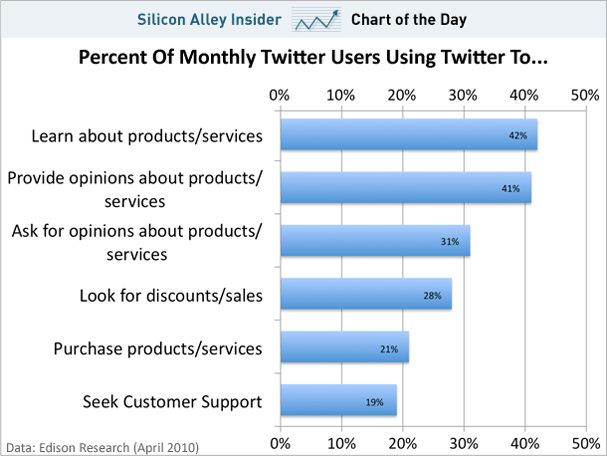
  •          Over 40% of the time that people are on Twitter, they are learning about products and services or providing opinions about brands.  If you aren’t on Twitter, they won’t be tweeting about you.
  •          Shocker: People actually spend a little over 20% of their time on Twitter BUYING products or services.  Again, if you aren’t on Twitter, the tweeters aren’t spending that purchasing power on you.  You’re missing out on ticket sales.  For other interesting ways that people are spending their time on Twitter, check the graph below.


  •        YouTube is the second largest search engine in the world.  Do you have a product or service that can be featured in front of a camera?  If you’re a theater, I have a feeling you do.  Get a YouTube channel for your theater, but read the Terms of Service agreement so that you understand what can happen to your content. 
  •          Content ownership technically belongs to the users, but YouTube's Terms of Service allows YouTube the licensing rights to use your content as they please until you delete it from the site.  So rather than uploading complete performance recordings that you are trying to sell, give samples and trailers.  Use Youtube for informational webcasts, behind-the-scenes bonuses, interviews with the artists and teasers for upcoming events.  Feature highlights from VIP parties for those valuable loyal fans and allow fans to upload their own footage from these events. 
  •          Always link these videos back to your main website, where you can feature/sell/rent your exclusive content.
  •          BONUS: A great idea that has yet to be used by a theater (at least to my knowledge) is a play, scene or passage done in the style of Virtual Choir.  I’ve certainly toyed with the idea of using this technique to produce an online version of Hamlet… or use it for an original play!

There are certainly more social networks to cover, but I’ve decided to keep my posts briefer in order to get them posted more frequently.  Speaking of social networks, why not connect with me on LinkedIn if you’d like to continue the conversation?  http://www.linkedin.com/in/danielleloebs

(Graph of “What has motivated you to “like” a company, brand or association on facebook?” courtesy of ExactTarget.  Chart of “Percent of Monthly Twitter Users Using Twitter To…” courtesy of Silicon Alley Insider from data collected by Edison Research.)