Tuesday, June 28, 2011

Tweet to Conquer! Can the Little Bluebird be Your Secret Weapon?

Topics in this Post Include:
-3 Ways You Can Use Twitter to Drive People to Your Website
-Using Twitter to Promote Your Shows, Events or Products


3 Ways You Can Use Twitter to Drive People to Your Website:
1.    By composing fabulous tweet headlines that attract views. The headline is the only thing readers will see before making the decision to follow your link. If the headline is catchy, they'll pursue it, if it isn't, you've just lost a potential viewer.

2.    By linking those headlines to high quality content. Content should have your potential audience/customers in mind and reward them with something useful, like practical tips, exciting offers or special deals. If the content on our sites is truly remarkable, people will start tweeting about it on their own.

3.    By using the Twitter "Favorites" feature to list positive reviews from your fans. At the bottom of each tweet in your Twitter stream, there is a little star. When you click the little star, that tweet gets added to your Favorites Tab. When you track what people are saying about you using Twitter Search,* favorite all of the positive tweets. These 3rd party testimonies will be valuable to show the public what other people think of your work.
*To monitor yourself (or your theater company) on Twitter, use the Twitter Search Tool (http://search.twitter.com) to search and track what people are saying about your company, products, competitors, events, campaigns or any other hot words in the industry.  Be helpful: if you find in your search that someone is looking for a service you know where to find, respond to connect them with the right people.  Others will begin to do the same for you! 

Using Twitter to Promote Your Shows, Events or Products

Tweet-ups are a great way to get to know your Twitter community offline. The next time you hold an event, fundraiser or open house, tweet about it! The best practice is to send people directly to an event-sign-up page.
VolunTweet-ups are a variation of the above geared toward gathering volunteers for charitable events. The name is still pretty new, but it is already earning a positive reputation for philanthropy across social media. VolunTweet-ups are a great way to get your Twitter followers to support and spread your causes and, as an indirect result: yourself.
The Hashtag for individual events, products and promotions should be selected and agreed upon before your group starts tweeting about them. This will enable you to track the mentions of the specific event, product or promotion using Twitter Search, and will increase each hashtag's likelihood of becoming a Trending Topic.


Selecting a hashtag for an event is also beneficial because:
• During the event, people often use the hashtag while live-tweeting, or tweeting what they see/hear in real-time. The hashtag will aggregate the event tweets, building an online conversation around the event.
• People who are not at the event will see your hashtag and perhaps use it too. A popular #hashtag often sparks curiosity, and people will go to Twitter Search to follow the conversation around the event.
Finally, it doesn't hurt to take a look at best practices to see how others are using Twitter to succeed.  Here are some helpful links:

Did you learn something useful from this post?  Click on the +1 button below so that others may find it!

Friday, June 24, 2011

Tech Report: Could HootSuite Be Your Social Media Savior?

Excuse the belated Tech Tuesday---I've been building websites round the clock this week!


With multiple social media sites, different events and content contributors, organizing and managing your social media campaigns can seem nightmarish.  Using services like HootSuite, however, can empower you to organize your content to schedule postings at the perfect time of day for any day of the year.  I've recently found out just how important good Social Timing happens to be.
Here is a great new infographic from KissMetrics on the science behind great social timing. On any given day, the best time to tweet is about 5pm ET, when about 6% of all re-tweets are made.  According to the study, 1-2 tweets per hour seems optimal for click through, especially mid-week or on weekends, at noon or between 5 and 6pm.  Meanwhile, Facebook is much more likely to drive shares and CTR on Saturday around lunchtime, so long as you don’t post more than once. 

Cool New Tools With HootSuite Publisher
1. Scheduling Tweets With Calender View.  
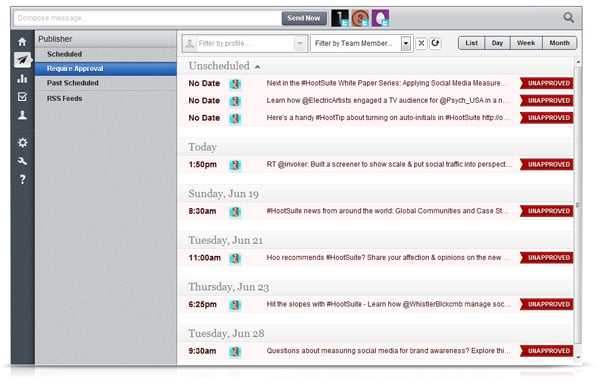
Since we may not have our schedules perfectly aligned to tweet or update our social networks at optimum times, HootSuite allows users to schedule their posts in advance.  As of June 15th 2011, HootSuite has made scheduling even easier.   Now you can slice and dice the destination profiles for each message and drag-and-drop your updates into time slots to match your editorial plans.
The whole power of daily/weekly/monthly calendar view (seen above) will soon only be available with Pro and Enterprise membership plans, but currently everyone can take the advanced scheduling functionality for a spin to see how calendar views can manage complex campaigns.
2. Limiting Permissions.
With this designation, collaborating interns, contractors and new recruits can share search streams and compose messages, but are limited from broadcasting directly to valuable company profiles. Instead, drafts are held for approval in the calendar view until a qualified Team Member pushes to the send queue. It’s ideal for ensuring accurate and appropriate updates.  Sadly, this is not a free tool, but if you plan on getting a lot of new blood to help you make content for your company's social media, it may be worth the investment.

How I Used HootSuite to Conduct 
a Successful Social Media Campaign for My Theater

1.  The first step was for me to define the goals of the campaign: I wanted to see more engagement (likes and comments) on the Rocklin Shakespeare Facebook page while teaching my viewers fun facts about the Bard.

2. Next, I took that goal and turned it into a game, a trivia challenge, to be exact.  I'd already written a great deal of Shakespeare Trivia Questions in preparation for another online game, so converting the questions into the proper format was easy.

3.  I added an incentive for users to play by offering a prize.  To get the ball rolling, I told users that it would take five "likes" on the post to uncover what that prize was, and launched into the game.  Oddly, users didn't seem to care what the prize happened to be, they were excited enough to be playing for a prize that they dove right in.  Eventually the status post got the five "likes" and I revealed three prize options: a Rocklin Shakespeare T-Shirt, a purse of ducats that was used as a prop in our production of The Taming of the Shrew, and the bragging rights of being featured with picture and bio on our Facebook hall of fame.

4.  But users were already engaged.  They didn't rush to unlock the prize, because liking that post wasn't worth any points.  Here was the first trivia question (last names are obscured for privacy):
Points were awarded to the first AND second responses with the correct answers.  This added a sense of urgency to the contest, and users rushed to be first and second.  To make the race fair, I always informed the viewers when to look for the next update.  This was easy to do, since I'd already scheduled the entire week-long contest in a few minutes on HootSuite.

5. At midnight, the answer was given along with an informative link about it.  Five minutes later, a bonus question appeared to reward viewers for checking the site at the appointed time.  The answer to the bonus question always featured in the informative link that came before it.  In this way, users would quickly learn to check posted links and would be rewarded for doing so.  Additionally, users got points for "liking" the bonus posts, which of course they did.

6.  I took this formula and repeated, with one question, one link and one bonus question each day for a week.  The final question was timed for noon on Saturday, which happens to be a peak time of the week for facebook sharing.

7. By analyzing the data on Facebook insights, saw that the contest increased the user interactions substantially.  Weekly post views rose by 217% and feedback increased by a staggering 3400%.  The campaign achieved its set goals.
The total cost of the contest was a T-Shirt (that I'd already had in overstock) and 99 cents in postage.  Again, using HootSuite I was able to type up and schedule a week's worth of facebook page updates in minutes.

Other Helpful Links:


Did you learn something useful from this post?  Click on the +1 button below so that others may find it when they search on Google.

Monday, June 20, 2011

Marketing Monday: Mobile Takeover! Expect SoLoMo Gamification to Explode.

Last Monday I wrote about the need for theaters (and others) to accept and utilize mobile marketing---even during shows/movies.  This week I have a few more numbers to back this claim.


According to a study published on Flurry this morning, the minutes U.S. consumers spend on their mobile apps has eclipsed the number of minutes they spend on the web, though both continue to rise.  Here's the chart:


Here's what Flurry reports U.S. mobile users are doing while they're on their mobile apps:


Gaming and social networking are, by far, the most common practices on Mobile Apps right now.


SoLoMo and the Rise of "Gamification"


SoLoMo stands for social, local and mobile.  The "gamification" of apps is a surefire way to engage a new generation of audiences, and by adding a gaming layer to social-local-mobile interaction, marketers are creating ways to get the biggest piece of the mobile pie.  


With geolocation applications and services like Foursquare, Gowalla, Loopt and BrightKite, as well as virtual check-ins on Twitter, Facebook and beyond, the convergence of SoLoMo is creating a whole new way to market.  These applications are social first, gaming second.  But what about apps that reverse the equation?


SCVNGR is location-based gaming first, social second.  While you can easily connect the game to social platforms like Facebook and Twitter, SCVNGR makes check-ins a mere gateway to a set of games and challenges designed for specific locations.


Take a look at a set of challenges for American Apparel:


The check-in is worth +1 point, while the main challenge (taking a picture of yourself posing like a mannequin) is worth +5.  The social aspects, such as sharing the picture or sharing the useful note you wrote about the store for the +2 points, are secondary.

The app is young, however, and has run into problems with implementation and follow-through.  It seems that if you wish to create a successful experience on SCVNGR, you have to do it yourself.


Here's a link on how to start a marketing campaign on SCVNGR.


 Geocaching, however, is also a game first, social second type of application.  It has been around a long time (11 years!) and is already active on all seven continents.  By putting a Geocache at the site of your business, you put yourself on their map for users to find.


Existing cache types allow for a game play, including:

  • Mystery/puzzle: This cache requires one to discover information or solve a puzzle to find the cache. Some mystery caches provide a false set of coordinates with a puzzle that must be solved to determine the final cache location. In other cases, the given location is accurate, but the name of the location or other features are themselves a puzzle leading to the final cache. Alternatively, additional information is necessary to complete the find, such as a padlock combination to access the cache.
  • Multi-cache: This variation consists of multiple discoveries of one or more intermediate points containing the coordinates for the next stage; the final stage contains the log book and trade items.
  • Event Cache: This is a gathering organized and attended by geocachers. Physical caches placed at events are often active only for the event date.

Idea for Adding a Game Layer to Traditional or Existing Caches:

  • QR or Scannable Codes.  Include these as a sticker on the inside or outside of your geocache.  When the code is scanned, users are linked to your website with your personal game challenges.  You can also link straight to a game located on the web.
GPS services aside, I'm still going to herald the potential of QR Codes, especially for entertainment events.  What if you're the lucky patron at a show (movie, theater, concert or other) with a QR code under your seat that gets you a free drink at the snack bar?  Or an upgrade to a backstage pass?  The basis for all of these social gaming platforms is the possibility of earning a reward, be it virtual (like 4square mayorship) or in real life.

Things to think about.

PS.  Since my brother designs mobile apps, you may be see the Theater Friendly App available in the near future.  

Thursday, June 16, 2011

TED Thursday: "How I Became 100 Artists" by Shea Hembrey

I love a funny TED Talk.  When you have a little time to laugh and be inspired by the wealth of imagination and creativity that can be generated by a single person, watch Shea Hembrey's talk entitled "How I Became 100 Artists."

About the Talk:

"How do you stage an international art show with work from 100 different artists? If you're Shea Hembrey, you invent all of the artists and artwork yourself -- from large-scale outdoor installations to tiny paintings drawn with a single-haired brush. Watch this funny, mind-bending talk to see the explosion of creativity and diversity of skills a single artist is capable of." -TED.com


One of my favorite quotes from the talk is Shea's explanation of his criteria for the art he wished to feature in his show:

"Among all of the criteria I had, there's kind of two main things. One of them I call my Mema's test, and what that is, is I imagine explaining a work of art to my grandmother in five minutes.  If I can't explain it in five minutes, then it's too obtuse or esoteric and it hasn't been refined enough yet.  It needs to be worked on until it can speak fluently.

My second set of rules---I hate to say "rules" because it's art--- but my criteria would be the three H's: Head, Heart and Hand.  Great art would have Head, [meaning] it would have interesting intellectual ideas and concepts.  It would have Heart in that it would have passion and soul, and it would have Hand in that it would be greatly crafted."

By stretching himself and creating different artists with unique backgrounds, interests and styles, Shea was able to put together 100 pieces of art that were at once accessible to a broad audience while reflecting different sides of himself as an artist.  In fact, the artists he invented were very much artistic creations in themselves.

I think Shea's criteria could be applied to all creative pieces, events and projects that we would like to share.   It is a way to focus the art on the audience while balancing the importance of the artist's technique, passion and concept.

What do you think?

-Danielle Loebs

Tuesday, June 14, 2011

Tech Tuesday: Google Instant Search Conference Reveals Cool New Tools

I postponed today's blog post last night in anticipation of the Google Instant Search press conference which was streamed live from San Francisco this morning.  I'm glad I did, because they revealed three seriously cool new tools.

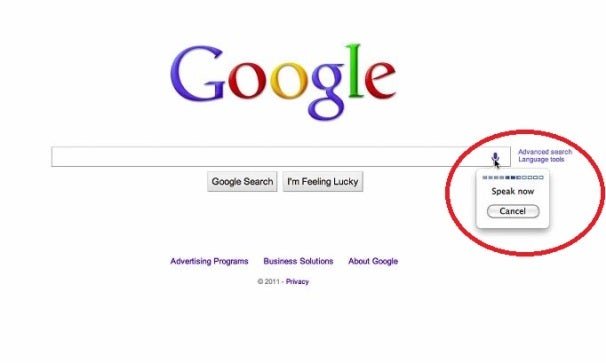
1. Instant Search Using Voice : 


How Voice Search will appear.
Click to enlarge.
Now you don't even have to type your search queries.  Just clicking on the microphone button in the search bar will enable you to speak your search request.  This is helpful when you don't know how to spell the words or more likely, the names of who/what you wish to search for.

It should be noted that this feature was already available and popular for mobile devices, but now is coming to your desktop on the Chrome browser.  Google's voice search traffic has risen six-fold in the past year, an increase that speaks to the popularity of speech recognition on mobile devices. It will be interesting to see if desktop and laptop PC users show the same enthusiasm for voice input.


2. Instant Search Using Images enables users to drag-and-drop, copy-and-paste image URL, or upload the image from the desktop into the search box. They can also use a Chrome or FireFox software extension to add images to the search. 


Google said the search-by-image feature will be available in most countries and regions over the next few days to Chrome users, noting that it will not collect and store any images that users use.

3. Instant Pages pre-renders Websites when it's confident you'll click on the top result of a query. In a demonstration today, pages loaded immediately when using Instant Pages, while an old version of Google search took an extra three or four seconds. Even when pages don't load immediately, they load a few seconds faster using Google Instant Pages.
The feature will be available today in the developer version of Google's Chrome browser, and this week in Chrome's beta version. Instant Pages will come to the stable version of Chrome and mobile browsers in the coming weeks. Because the code is open source, developers can build Instant Pages extensions for other browsers as well.  
"Uh... that's cool, but what does this have to do with theater ideas?"  
Good point.  Let's imagine.
Image Search-
You're a costume designer and have finished the latest round of sketches for the cast of A Streetcar Named Desire.  After scanning them into your computer (unless you work primarily on a drawing tablet already) you drag the sketch into the search bar.  Immediately, shopping results for vintage clothing that look exactly like what you sketched Blanche in pop up, and you're able to find the best deal.
OR
You're a theater director in Oregon planning on touring a production of Shakespeare's a Midsummer Night's Dream in an outdoor setting in Virginia.  You want to scout a location that has the same curving trees and ground cover as your neighborhood park.  You take a photo of the Oregon location, drag it into the search bar, and find a great match at a Virginia country club complete with booking information.
OR
You're a location scout for a film project and you need to find a building in town that looks enough like the high school the script is based on 100 miles away...  
You see where I'm getting at.
Voice Search and Instant Pages provide more general conveniences.  Instant Pages save seconds of time, but they add up.  Perhaps that time saved only allows a person to make one extra search each day, but that search might be for you.
Voice Search is mostly useful when you don't know how to spell something, like the name of the Russian actor you're supposed to locate for your theater's next production of Uncle Vanya.  To be honest, when Voice Search allows me to go completely hands free and talk to my computer like a Star Trek character while I'm hand stitching a costume, I'm going to get far more excited.  

PS.  All information in this article was obtained from the notes I took while watching the Google Instant Search conference.  The images are courtesy of Google Instant.

Sunday, June 12, 2011

Marketing Monday: Why Theaters Should Tell Patrons to Turn ON Their Phones

Take a moment to imagine a scenario with me:

You arrive at the theater to watch a play.  The House Manager (or whomever fills the function) approaches the stage (or loudspeaker) and welcomes the crowd.

"Ladies and Gentlemen," they say, "thank you for joining us at [name of theater company] for [name of play].  At this time, I would like you to take out your cell phones and turn them on."

Now wouldn't that be surprising?

Here are a few things I would love for the House Manager to say next:

  • "Now send a text saying: fan [your page name] to 32665 or FBOOK to like us on Facebook."
  • "Now text 40404 with the message: follow [your username] to follow us on Twitter."
  • "Please turn on our Theater Friendly Phone Application while texting about the show in progress!"
First, I really don't understand why I have not seen this done.  Obviously the people coming into the theater like your organization enough to shell out for tickets, so capturing dozens (even hundreds) of new "likes" and followers each night should be easy!

But wait, what was that last bullet point?

New Idea: The Theater Friendly Phone App

This post was actually inspired by a story I read about a movie theater.  Apparently a patron became disgruntled when she was asked to turn off her cell phone during a movie and management had her thrown out.  The woman's indignation at the turn of events was recorded in a (probably) drunken phone call to the theater.  The theater's response with the ex-patron's inebriated rantings was to add captions and turn the recording into a YouTube video.

While I appreciate a good laugh, and want to smile at their creativity, I feel they're missing a big point:

People don't like to turn off their cell phones.

Even I feel apprehensive when I am unreachable for over two hours.  What if something happened to a family member?  Don't forget that many of those patrons hired a baby sitter and probably want to be contacted in case of an emergency.  So why not take on a huge chance to increase audience engagement for your theater by being the first to allow cell phone usage during a show or movie?  I think it's a great idea, considering that I've also mentioned some astonishing statistics from Google about how addicted Americans are to their phones.

For Review:
  • 72% use their phones while "consuming other media." A third of that use is while watching TV.
  • 39% use their phones while they're in the bathroom .
  • 20% would rather give up their cable TV before giving up their phones.

I want to see an app that:
  1. Is included with the purchase of a show/movie ticket (either as a free download with online purchase or as a QR Code on the physical ticket).
  2. Will dim the screen and mute all sounds on the phone to prevent any obstructions in visibility or audibility for other audience members.
  3. Blocks video recording (though how one would be able to sell a bootleg movie or show from a cell phone is beyond me).
  4. Prompts the user to "like" the theater on Facebook and follow it on Twitter.
  5. Logs ticket purchases and suggests new releases based on the user's preferences (like Netflix and more).
  6. Allows the user to tweet/update their Facebook about the experience at the theater and rate the movie or show.
Will this cause spoilers?  Not any more than usual.  I see most patrons getting on their phones as soon as they leave the theater anyway.  Why not let them talk about you for the two hours they're enjoying your service?

I'm probably going to be giving my code master a call... but in case he's busy: somebody should be doing this!

Controversially Yours,

Photo courtesy of unreality.com.

Thursday, June 9, 2011

Fun Friday: Got Shakespeare? The Comic!

I’m a big webcomics junkie.  I’m also a playwright.  So I’ve always dreamed of one day posting one of my plays as a webcomic.

Tthe trouble is… I’m not a great artist. 

Don’t get me wrong, I watched a lot of Bob Ross growing up and can paint a pretty damn happy looking tree, but working with a drawing tablet is hard.  I have nothing but respect for the webcomic artists out there.  Still… I already had the script for converting one of my plays into a webcomic, and after much determination, created page 1 of the prologue:


I still intend to feature artists and innovators on Fun Fridays, but if you’d like to see more of my play as a comic, I’ll draw my little heart out and put up the pages whenever I can. 

Cheers!
-Danielle Loebs

PS. If you do wish to see more of Got Shakespeare? The Comic, would you click the +1 button, below?